
Two sound devices for the call app: the show's sound in, the call's sound back.
Live Producer Mic and Live Producer Return are two sound devices on your Mac, made for call apps. The Mic carries the show’s sound into the call. The Return carries the call’s sound back into the show.
Live Producer Mic
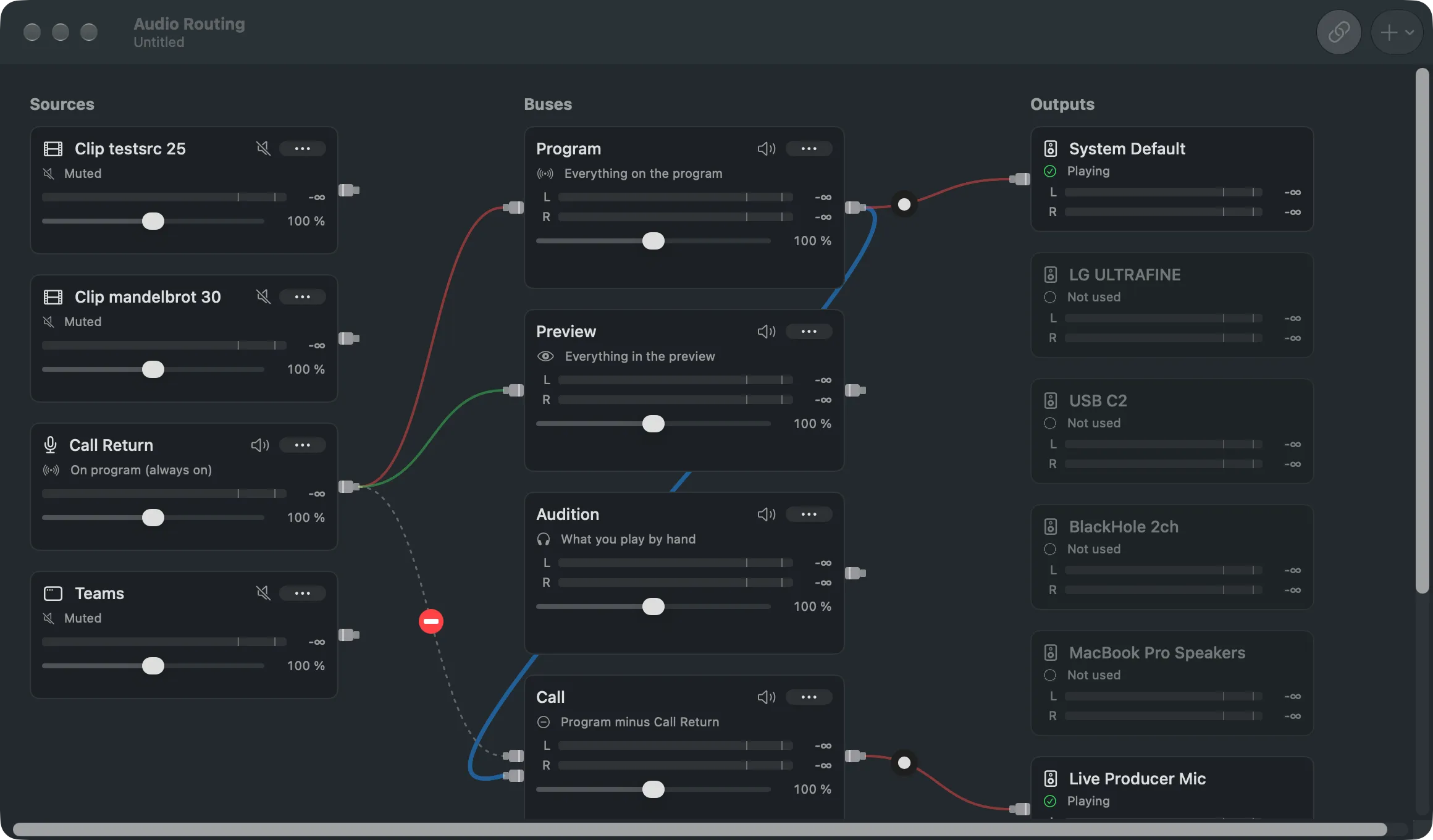
Section titled “Live Producer Mic”The call app picks Live Producer Mic as its microphone. In the Studio, you send a bus to it in Audio Routing, like any output device. What that bus carries is what the call hears.
Live Producer Return
Section titled “Live Producer Return”The call app picks Live Producer Return as its speaker. In the Studio, the Return is an audio input source, so the remote people can be heard in the room, in the recording and in the stream.
Nobody hears themselves
Section titled “Nobody hears themselves”If the call’s sound went back into the call, the remote people would hear themselves. So the bus to the Mic takes everything on the program minus the Return: a mix-minus. Set Up Show for Video Call builds that for you:
| Added to the show | What it is |
|---|---|
| Call Return | The Return as an audio input, heard all the time |
| The app’s window | A source for the remote people’s picture, its sound off, since the Return carries it |
| Call bus | Everything on the program minus Call Return, playing to Live Producer Mic |
Everything stays editable in Audio Routing. See Buses.
Installing
Section titled “Installing”The two devices are installed together, once per Mac, from Settings › This Mac › Video Calls. Installing asks for your administrator password and restarts the Mac’s sound for a second, so never install during a show. Live Producer reconnects by itself, but a call app may switch to the Mac’s own speakers and microphone: check its devices afterwards.
Read more
Section titled “Read more”Describes Live Producer 0.305 · 29 October 2026